


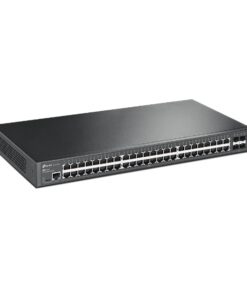


TP-Link TL-SG3452 JetStream 48-Port Gigabit L2 Managed Switch with 4 SFP Slots
• Full Gigabit Ports: 48× gigabit RJ45 ports and 4× gigabit SFP Slots provide high-speed connections.
• Integrated into Omada SDN: Zero-Touch Provisioning (ZTP)*, Centralised Cloud Management, and Intelligent Monitoring.
• Centralised Management: Cloud access and Omada app for ultra convenience and easy management.
• Static Routing: Helps route internal traffic for more efficient use of network resources.
• Robust Security Strategies: IP-MAC-Port Binding, ACL, Port Security, DoS Defend, Storm control, DHCP Snooping, 802.1X, Radius Authentication, and more.
• Optimise Voice and Video Applications: L2/L3/L4 QoS and IGMP snooping.
• Standalone Management: Web, CLI (Console Port, Telnet, SSH), SNMP, RMON, and Dual Image bring powerful management capabilities
HARDWARE FEATURES
Interface • 48× 10/100/1000 Mbps RJ45 Ports
• 4× Gigabit SFP Slots
• 1× RJ45 Console Port
• 1× Micro-USB Console Port
Fan Quantity Fanless
Power Supply 100-240 V AC~50/60 Hz
Dimensions ( W x D x H ) 17.3×8.7×1.7 in (440×220×44 mm)
Mounting Rack Mountable
Max Power Consumption 32.8 W (220 V/ 50 Hz)
Max Heat Dissipation 111.91 BTU/h (220 V / 50 Hz)
PERFORMANCE
Switching Capacity 104 Gbps
Packet Forwarding Rate 77.4 Mpps
MAC Address Table 16 K
Jumbo Frame 9 KB
SOFTWARE FEATURES
Quality of Service • 8 priority queues
• 802.1p CoS/DSCP priority
• Queue scheduling
– SP (Strict Priority)
– WRR (Weighted Round Robin)
– SP+WRR
• Bandwidth Control
– Port/Flow based Rating Limiting
• Smoother Performance
• Action for Flows
– Mirror (to supported interface)
– Redirect (to supported interface)
– Rate Limit
– QoS Remark
Product Last Updated: 11/12/2025







Paul Morales –
I recently purchased the TP-Link SG3452 Omada 48-Port Gigabit L2+ Managed Switch, and I have to say, it’s been quite an experience! Setting it up was fairly straightforward, thanks to its intuitive web interface. The centralized management features really stand out, making it easy to oversee our network performance and configuration with just a few clicks. I appreciate the four SFP slots that provide flexibility for our connectivity needs, especially as our office infrastructure continues to grow.
On the performance side, the switch has been rock solid. I haven’t experienced any hiccups or slowdowns, even with multiple devices connected simultaneously. It’s refreshing to find a managed switch that combines power and efficiency so well. However, I did find the user manual to be a bit lacking; it could use some clearer explanations for newcomers to networking. Some of the advanced features, like static routing, were not as user-friendly as I had hoped.
Despite this minor setback, the overall reliability and features of the SG3452 make it a great investment for our business. TP-Link has really delivered with this one, and I’d definitely recommend it to anyone looking for a robust managed switch that can grow with their needs. Just be prepared to do a bit of research if you’re new to managed switches!
Alexander Gray –
I recently decided to upgrade my network setup and went with the TP-Link SG3452 Omada 48-Port Gigabit L2+ Managed Switch, and I must say, it has been an interesting experience. Right out of the box, the build quality feels solid, which gave me a bit of confidence that I was making a worthy investment. The management features, especially with the Omada SDN, are quite comprehensive, but I found the initial setup to be a bit tricky.
Now, I’m no networking expert, so I was hoping for something plug-and-play, but I had to dive into the user manual more than I expected. Once I got past that hump, I appreciated the centralized management it offers; it really does streamline things if you’re looking to manage multiple devices. Also, having those 4 SFP slots is a nice touch, allowing for some future-proofing in my setup.
However, the performance hasn’t been without hiccups. Occasionally, I’ve noticed some latency issues when many devices are connected, which makes me question the handling capabilities under heavy load. On the flip side, the static routing feature has been a lifesaver for optimizing my network, so there’s definitely a trade-off. Overall, I think the TP-Link SG3452 is a solid choice for an SMB setup, but I wish it came with a bit more user-friendly guidance for those of us who aren’t as tech-savvy.